





GSI Labs Get Started

For Design Offices

Design Automation

Intelligent plugins that turn repetitive BIM tasks into one click workflows. Built for Revit, Tekla, Allplan, and Archicad.

Get Started
Two engineers reviewing a structural model on screen

Built for the tools your team already uses, not around them.

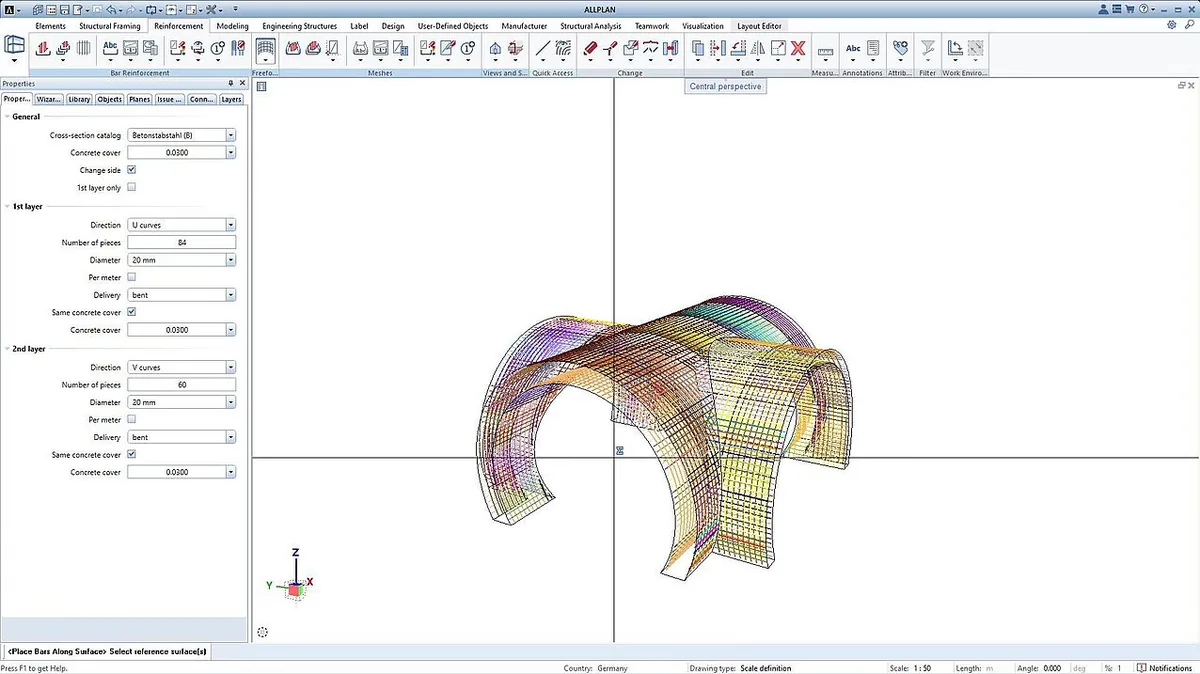
CAD window with a curved shell model beside the parameter panel that drives its reinforcement

We map your team's daily BIM workflows to identify where manual effort slows projects down. From reinforcement detailing to element placement and drawing production, we find the automation opportunities with the highest impact.

  • Task by task analysis of your BIM authoring process
  • Identification of repetitive, rule based operations
  • Works across Revit, Tekla, Allplan, and Archicad

Custom BIM plugins that run inside your authoring environment, not beside it.

If you have further questions, please reach out via our Contact page.

Contact us
Which BIM platforms do you support?

We build plugins for Revit, Tekla Structures, Allplan, and Archicad. If your office uses a different authoring tool, let us know. The approach is the same regardless of platform: we analyze your workflows first and then build directly into the environment your team already uses.

How long does it take to develop a custom plugin?

Most plugins go from first workshop to a working version in 6 to 10 weeks. Simpler automations like standardized element placement can be ready in 4 weeks. More complex workflows involving multiple standards or cross platform logic may take up to 12 weeks. We always deliver a testable version early so your team can provide feedback before the final release.

Will the plugin work with our existing templates and standards?

Yes. That is the entire point. Every plugin is built around your specific templates, naming conventions, layer structures, and drawing standards. We do not ship generic tools. We start by reviewing your existing project setup and make sure the automation produces output that is indistinguishable from what your engineers would create manually.

What happens when our BIM software gets updated?

We maintain compatibility with new software versions as part of our ongoing support. When Autodesk, Trimble, or Nemetschek release updates, we test and update the plugin to make sure it continues to work. You do not need to worry about an update breaking your automation.

Can the plugin handle project specific requirements?

Yes. Plugins can be configured to adapt to different project types, clients, or regional standards. If your office works on residential and commercial projects with different requirements, the plugin can detect the project type and apply the right rules automatically. We build in flexibility from the start so you do not need a separate tool for every scenario.

Do we need programming knowledge to use the plugins?

No. The plugins are designed for engineers and planners, not developers. Your team interacts with them through buttons, menus, and dialog boxes inside the BIM software they already know. No scripting, no command lines, no technical setup. If someone can use Revit or Tekla, they can use the plugin.

Faster project delivery through intelligent automation of repetitive design tasks.

Planning offices spend up to 40% of project time on tasks that follow clear rules and patterns. Our plugins handle those tasks automatically so your engineers can focus on the work that requires their expertise.

Two engineers working through a coloured site plan together
70%
Reduction in repetitive BIM tasks
4x
Faster drawing production on automated workflows

* Figures based on simulated project data. Actual results may vary depending on project size, communication volume, and data quality.

Why partner with GSI Labs?

Practical Innovation

We do not build generic tools. Every plugin is tailored to how your specific office works. Your templates, your standards, your naming conventions.

The automation fits your process, not the other way around. We test on your live projects and iterate until the results match your quality expectations.


Strategic Edge

While other offices still place reinforcement bar by bar, your team delivers in a fraction of the time. Automation is not just about speed.

It reduces errors, enforces standards automatically, and frees up your senior engineers for the work that actually requires their judgment. Over time, this compounds into a real competitive advantage.

Industry DNA

Our team includes structural engineers, BIM specialists, and software developers who have worked inside planning offices.

We understand the difference between a Revit family and a Tekla component. We know what a drawing index looks like. That means no long onboarding, no explaining your industry. We start building on day one.